

Structured Cabling in Miami: 10 Things Businesses Should Plan Before Installation
Planning structured cabling in Miami? Learn what businesses should define before network, data, phone, fiber, WiFi, camera, and PoE cabling is installed.
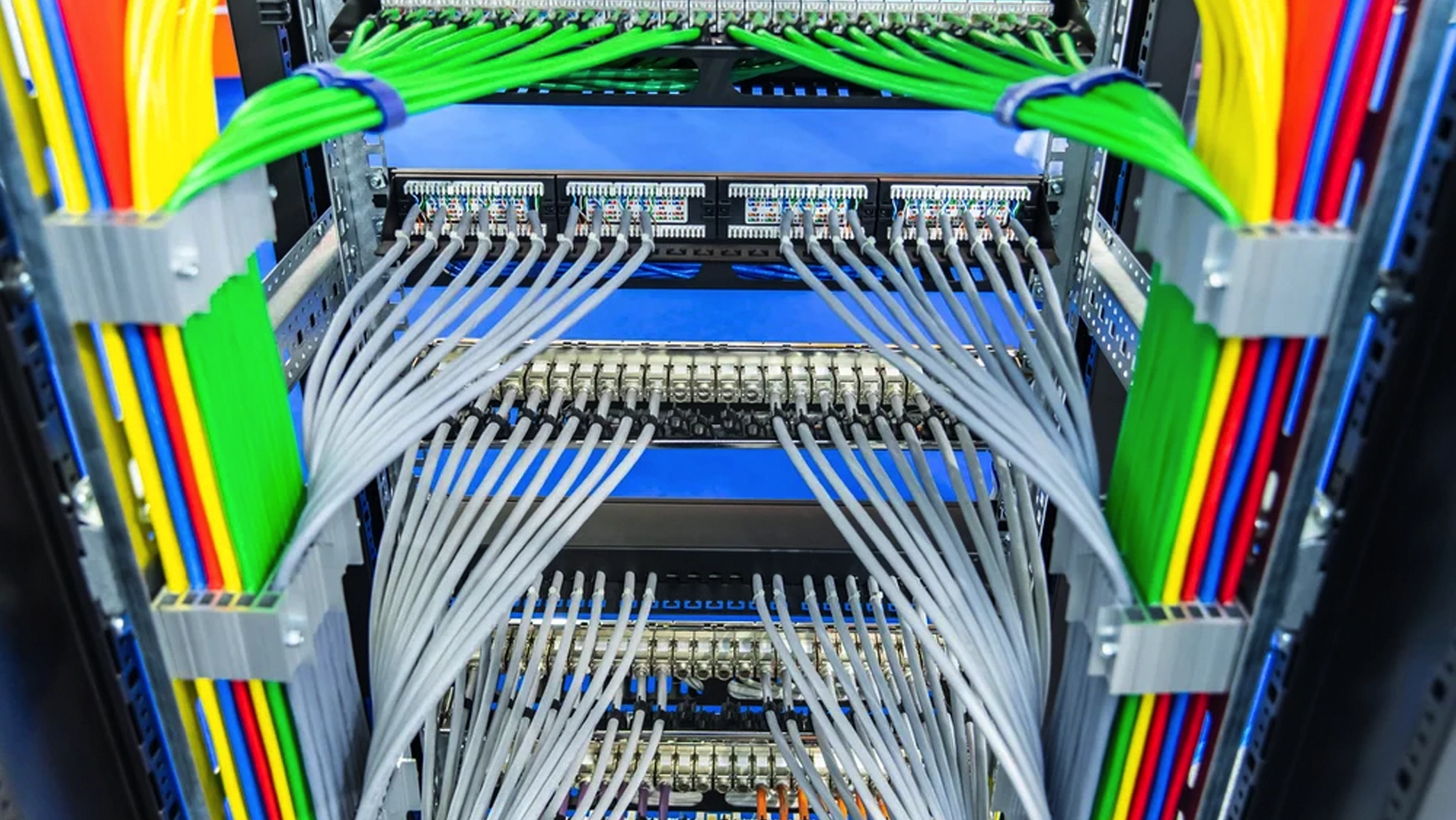
Structured cabling is easy to ignore because most of it disappears above ceilings, inside walls, behind patch panels, and into equipment rooms once a business is open.
But that hidden infrastructure can influence how easy it is to connect, troubleshoot, expand, and reorganize the technology a business depends on every day.
Workstations, wireless access points, VoIP phones, cameras, printers, displays, access-control devices, switches, servers, and other connected systems may all depend on the physical cabling underneath the network.
That is why a structured cabling installation should begin with a plan for the business systems the cabling needs to support, not simply a count of wall jacks.
For Miami and South Florida businesses, that planning can be especially important during office build-outs, renovations, relocations, expansions, network upgrades, camera projects, or WiFi improvements where multiple technology systems need to share the same physical infrastructure.
SMART Solutions provides Structured Cabling for data, telephone, network equipment, computer centers, and fiber optic connectivity needs, along with broader Networking and connectivity services.

SMART takeaway
The best time to plan cabling is before the walls, ceilings, racks, and devices make changes expensive.
Map the systems, cable routes, equipment locations, power requirements, labels, testing, and future capacity before the first cable is pulled.
Quick answer
A structured cabling project should define which devices need connections, where network equipment will live, what copper or fiber media are appropriate, how pathways and telecommunications spaces will be organized, whether Power over Ethernet will be used, how cables will be labeled and tested, and how much room should be left for future expansion.
The goal is not simply to install cable that works on day one.
The goal is to create a physical network foundation that is easier to understand, support, modify, and expand as the business changes.
What is structured cabling?
Structured cabling is an organized approach to the physical telecommunications infrastructure inside a building or campus.
Instead of running one-off cables wherever a device happens to need a connection, the cabling system is planned around standardized pathways, telecommunications spaces, backbone connections, horizontal cabling, termination points, labeling, testing, and administration.
The Telecommunications Industry Association identifies TIA-568 as the commercial-building telecommunications cabling standards family. TIA also maintains standards work specifically for structured cabling and telecommunications infrastructure.
Sources: TIA — TIA-568 Commercial Building Telecommunications Cabling Standards and TIA — Technology & Standards
BICSI’s current distribution-design guidance covers telecommunications spaces, backbone and horizontal distribution systems, ICT cables and connecting hardware, field testing, outside plant, wireless networks, electronic safety and security, and project administration.
Source: BICSI — Distribution Design
That broader view is useful because business cabling rarely supports only computers.
It may also support:
- Desktop and laptop network connections
- Wireless access points
- VoIP phones
- Security cameras
- Access-control devices
- Printers and multifunction devices
- Conference-room systems
- Digital displays
- Servers and network equipment
- Building and IoT devices
1. Define every system that will use the cabling
The first question should not be, “How many network drops do we need?”
It should be, “What systems need to communicate, and where will those systems be located?”
Start with a device and space inventory.
For each office, room, entrance, ceiling area, equipment space, conference room, reception desk, camera location, printer station, and shared area, identify the technology that may need a wired connection now or in the foreseeable future.
A useful planning list can include:
- Employee workstations
- Wireless access points
- IP phones
- Cameras
- Door controllers and access devices
- Conference-room displays and controllers
- Printers
- Network-connected televisions or signage
- Servers, switches, firewalls, and other rack equipment
- Future desks, rooms, or expansion areas
This prevents the cabling plan from being based only on today’s desk layout.
It also creates natural coordination with other projects. A business that is also improving commercial WiFi, adding cameras, or deploying VoIP should plan those endpoints before pathways and cable quantities are finalized.
2. Choose the equipment room and network locations early
Every cable eventually has to terminate somewhere.
If the network rack, telecommunications room, or equipment area is selected too late, the cabling design can become a collection of compromises.
The equipment location should be planned with the network design, available pathways, service-provider handoff, equipment requirements, future growth, and physical access in mind.
For larger offices or multi-floor environments, one central location may not be the only telecommunications space required. The building layout and distances can influence whether additional distribution points or backbone connections are needed.
BICSI’s distribution guidance treats telecommunications spaces, backbone distribution, and horizontal distribution as separate parts of structured-cabling design rather than one undifferentiated wiring task.
Source: BICSI — Distribution Design
3. Decide where copper makes sense and where fiber is appropriate
Not every connection has the same requirement.
Copper Ethernet cabling is common for many office endpoints because it can support network connectivity and, when designed for it, Power over Ethernet for compatible devices.
Fiber optic cabling is often considered for backbone connections, longer runs, building-to-building links, high-capacity connections, or projects where electrical isolation and future bandwidth planning matter.
The correct choice depends on the application, distance, environment, equipment, pathway, performance requirements, and budget.
TIA maintains a dedicated optical-fiber component standard within the TIA-568 family. In 2022, TIA published ANSI/TIA-568.3-E as an updated optical fiber cabling component standard.
Source: TIA — ANSI/TIA-568.3-E Optical Fiber Cabling Component Standard
SMART Solutions’ current Structured Cabling service includes structured wiring for data, telephone, network equipment, computer centers, and fiber optic project support.
The important planning decision is to avoid treating every cable run as interchangeable.
4. Plan for Power over Ethernet before choosing switches and cable quantities
Many modern business devices can receive both data and electrical power over Ethernet cabling.
That may include certain wireless access points, phones, cameras, displays, access-control devices, and other network equipment.
Power over Ethernet can simplify deployment, but it also means the cabling plan, switch selection, device power requirements, port counts, and power budget need to be considered together.
The Ethernet Alliance describes IEEE 802.3bt as four-pair Power over Ethernet and documents Type 3 and Type 4 power levels that extend beyond earlier PoE generations.
Source: Ethernet Alliance — Overview of IEEE 802.3bt Power over Ethernet
For a business, the practical planning questions are simpler:
- Which devices require PoE?
- How much power does each device require?
- Does the selected switch support the required PoE standard and total power budget?
- Are there enough switch ports for current and future devices?
- Will new cameras, access points, phones, or access-control devices be added later?
Do not wait until installation day to discover that the network has enough Ethernet ports but not enough PoE capacity for the devices being connected.
5. Coordinate pathways, penetrations, and building work before installation
Cable still has to move through a real building.
That means ceiling spaces, risers, conduits, sleeves, cable supports, wall penetrations, equipment rooms, furniture, construction sequencing, and other building conditions can affect the installation.
BICSI’s installation guidance explicitly includes space preparation and support systems, cable installation, testing and troubleshooting, firestopping, bonding and grounding, retrofits, and project documentation.
Source: BICSI — Cable Installation
That is one reason cabling should be coordinated with construction and renovation work rather than treated as a last-minute technology task.
For a Miami office build-out or renovation, clarify responsibilities early among the technology team, general contractor, electrical contractor, property management, and other trades involved in the space.
Applicable building, firestopping, pathway, grounding, and electrical requirements should be handled according to the project, local requirements, and the appropriate responsible professionals. A blog checklist cannot replace project-specific code review.
6. Build labeling and documentation into the project
A cable that works but cannot be identified quickly becomes a future troubleshooting problem.
Each permanent link should have an understandable identity that connects the outlet, cable, patch panel, rack, and documentation.
TIA’s ANSI/TIA-606-C administration standard applies to telecommunications infrastructure inside buildings and between buildings, including existing, renovated, and new facilities.
Source: TIA — ANSI/TIA-606-C Administration Standard
The business does not need a complicated naming system for the sake of complexity.
It needs a consistent one.
A useful handoff should make it possible to answer questions such as:
- Which patch-panel port serves this wall outlet?
- Which cable serves this access point or camera?
- Which telecommunications room does this endpoint return to?
- Which ports are active, spare, or reserved?
- Where is the current cable map or schedule stored?
Support reality
Good labels reduce guesswork long after the installer leaves.
A documented cable plant is easier to troubleshoot, modify, expand, and hand off to future IT teams.
7. Specify testing and handoff before the project begins
Testing should not be an afterthought added only when a problem appears.
The expected testing and documentation should be defined before installation begins so everyone understands what “complete” means.
BICSI’s distribution and installation manuals both include field testing, cable testing, troubleshooting, and project documentation as explicit parts of cabling work.
Sources: BICSI — Distribution Design and BICSI — Cable Installation
Depending on the project, handoff information may include:
- Outlet and patch-panel labels
- Cable schedules or maps
- Test results where applicable
- Rack and patch-panel documentation
- Fiber identification and termination information
- Photos of critical equipment areas
- Notes about spare ports, pathways, or future capacity
This documentation becomes especially valuable after an office move, staff change, renovation, device replacement, or future network upgrade.
8. Leave deliberate capacity for growth
A cabling system can remain in place through several generations of computers, access points, phones, cameras, and network equipment.
That makes future growth part of the initial design problem.
A business may add:
- More employees
- Additional wireless access points
- More cameras
- New access-control doors
- Conference-room technology
- Additional VoIP phones
- New network closets or equipment
- New suites, floors, or adjacent space
Planning spare pathways, rack capacity, patch-panel space, switch ports, and selected extra cable locations can be easier than reopening finished construction for every future change.
The correct amount of spare capacity depends on the business and project. The point is to make the decision intentionally rather than assuming the current floor plan will never change.
9. Treat WiFi, cameras, phones, and access control as part of the same infrastructure conversation
Modern business systems overlap.
A wireless access point needs both network connectivity and often PoE. A security camera may need the same. A VoIP phone depends on the wired network even when the employee thinks of it as “the phone system.” Access-control hardware may also depend on networked controllers or connected devices.
That is why cabling conversations should happen alongside broader infrastructure planning.
SMART Solutions provides related services for Networking, WiFi Network Improvements, VoIP Phone Systems, and Security Cameras & Surveillance.
A coordinated plan can help avoid installing a wireless system, phone system, camera system, and structured cabling project as four unrelated jobs that later compete for the same rack space, switch ports, pathways, or PoE capacity.
10. Plan the final documentation and ownership before the installer leaves
A structured cabling project is not finished when the last cable is terminated.
The business should know what was installed and who owns the records.
Before closeout, confirm:
- All planned endpoints are installed and identified.
- Patch panels and outlets use a consistent labeling scheme.
- Required testing has been completed and results are available where applicable.
- Rack and telecommunications-space documentation matches the installed condition.
- Spare ports and future-use cabling are clearly identified.
- Documentation is stored somewhere the business can retrieve later.
- Future moves, adds, changes, and support responsibilities are understood.
That final handoff protects the value of the planning work that came before it.
Structured cabling vs. ordinary point-to-point wiring
The difference is not that every structured cabling project is large or complicated.
The difference is that the infrastructure is designed as a system.
For a small office, that structure may be simple.
For a multi-floor or multi-building environment, it can be much more extensive.
Either way, organization is the principle that makes future support easier.
When should a Miami business consider a structured cabling project?
Structured cabling is worth planning when a business is:
- Opening a new office
- Renovating or relocating
- Adding employees or workstations
- Replacing disorganized legacy wiring
- Deploying new WiFi access points
- Adding cameras or access control
- Moving to VoIP
- Adding a server or network rack
- Connecting multiple floors or buildings
- Planning fiber optic connectivity
The earlier the cabling plan is included in the project, the easier it is to coordinate device locations, pathways, equipment spaces, and future capacity with the rest of the build-out.
How SMART Solutions helps
SMART Solutions provides structured wiring systems that support data, telephone, network equipment, computer centers, and fiber optic connectivity needs.
The current Structured Cabling process begins by reviewing the space, equipment, data needs, phone systems, network layout, and installation requirements. From there, the project can be planned around structured wiring, cable paths, network points, equipment areas, and fiber optic needs where applicable, followed by installation, organization, connection, and testing.
That service can also connect naturally with broader Network & Connectivity work when the business is upgrading switches, WiFi, WAN connectivity, or other network infrastructure at the same time.
Planning a cabling project?
Design the physical network around the business you are building, not only the devices you own today.
SMART Solutions can help plan structured cabling, network infrastructure, fiber needs, device connectivity, and related technology for South Florida business environments.
Contact SMART Solutions to discuss structured cabling for an office build-out, renovation, relocation, network upgrade, or expansion.